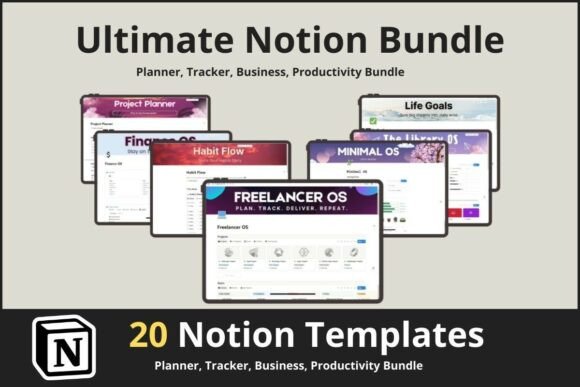
Organize Everything: The 20 Notion Templates Bundle
Most productivity systems fail because they rely on friction. You open an app, get distracted by a notification, and lose twenty minutes of deep work. The 20 Notion Templates Bundle is designed to stop that cycle. It isn’t just a collection of pages; it is a unified operating system for your digital life. When you download this bundle, you aren't just getting files—you are acquiring a framework that mimics the organizational clarity of a premium design system. It acts like a high-quality typeface for your data: it provides structure, hierarchy, and consistency to the chaos of daily tasks, allowing you to focus on execution rather than administration.
The Visual Architecture: Structure as a Design Asset
In typography and design, we talk about the "personality" of a font. A serif font feels traditional and authoritative; a sans-serif feels modern and clean. The 20 Notion Templates Bundle operates with a similar visual philosophy. It offers a minimalist, grid-based aesthetic that prioritizes whitespace and clarity. Just as a graphic designer selects a premium font to ensure readability, you should select a digital workspace that minimizes visual noise.
The visual characteristics of this bundle rely on clean lines and distinct sections. Think of the "NoteGrid" or the "StickyFlow Board" not just as tools, but as layout templates. They utilize a modern approach to information architecture, ensuring that your "Finance OS" looks as professional as your "Project Planner." For entrepreneurs and freelancers, this visual consistency is vital. It mirrors the principles of brand identity. When your internal tools are organized and aesthetically pleasing, it reduces cognitive load. You stop fighting the interface and start working within it. The "Minimal OS" template, for example, strips away the unnecessary, much like a well-designed sans serif font, leaving only what is essential for high performance.
Practical Applications: From Brand Strategy to Personal Growth
Understanding where to deploy these templates is similar to understanding font pairing. You wouldn't use a decorative script font for body copy, and you shouldn't use a complex project tracker for simple grocery lists. The strength of the 20 Notion Templates Bundle lies in its versatility across different domains.
For the Creative Professional and Entrepreneur
If you are a designer, marketer, or agency owner, your workflow likely involves juggling multiple clients. The "CRM Tracker" and "Project and Task Tracker" templates act as your editorial design for business operations. They allow you to manage client relationships with the same precision you apply to logo design or packaging design. The "Freelancer Template" specifically addresses the chaos of invoicing and client management, functioning as a commercial font does in a corporate deck—it grounds the work in professionalism.
Consider the "Second Brain" template. For content creators and writers, this is the digital equivalent of a serif font in a novel—it supports long-form thinking and complex idea generation. It allows you to capture fleeting thoughts, categorize research, and build a repository of knowledge that fuels your web design or blog content strategy.
For Personal Mastery and Daily Habits
The "Life OS" and "Habit Tracker" templates bridge the gap between professional ambition and personal well-being. We often treat our personal goals with less design rigor than our client work. This bundle changes that. By using the "Daily Planner," you are applying the principles of visual hierarchy to your day. You prioritize high-value tasks (H1 headings in your life) over low-value distractions. The "Life Goals Mastery" template helps you visualize long-term aspirations, turning abstract dreams into actionable data points.
Implementing the System: A Guide to Evaluation and Fit
Choosing to integrate the 20 Notion Templates Bundle into your workflow requires a bit of testing, much like reviewing a font library before a major rebrand. You need to evaluate the fit for your specific needs.
- Evaluate Your Workflow: Before importing everything, identify your bottlenecks. Are you losing passwords? Start with the "Password Manager Pro." Are you missing deadlines? The "Project Planner" is your immediate fix. Treat these templates as design assets that solve specific problems.
- Customization and Brand Consistency: The "Easy to use" nature of these templates shouldn't be mistaken for rigidity. They are fully customizable. If your brand uses specific colors or iconography, apply them here. This creates a psychological connection between your workspace and your output. It reinforces your brand identity even when you are just organizing your week.
- Testing the "Pairings": In design, we test font pairing to ensure harmony. Here, you test template integration. Can your "Sticky Notes Dashboard" coexist with your "Finance OS"? The bundle is designed for interoperability, but you should spend a week migrating data to ensure the flow feels natural to your specific cognitive style.
The "Library OS" is a prime example of a template that works best when customized. It functions like a display font—it’s the headline of your knowledge management system. Use it to store critical documents, brand guidelines, or creative inspiration. Conversely, the "Task Tracker" is your workhorse, akin to a reliable body text font. It needs to be legible, accessible, and constantly updated.
The ROI of Digital Organization
Why invest time in setting up the 20 Notion Templates Bundle? The answer lies in efficiency and scalability. In the same way that modern typography improves the reading speed of a magazine, a structured digital environment improves your decision-making speed.
For small business owners and agencies, the "Project and Task Tracker" provides a bird's-eye view of team capacity. It prevents burnout by making workloads visible. For students and professionals, the "Daily Planner" transforms a reactive day (responding to emails) into a proactive one (executing on goals).
Ultimately, this bundle is about removing friction. It is about having a system that looks as good as it functions. By treating your digital organization with the same respect you give to creative fonts and design layouts, you elevate your work from a list of tasks to a cohesive, professional operation. Whether you are managing a global agency or simply trying to remember to water the plants, the infrastructure provided by this bundle ensures you do it with clarity and style.